Firefox for Android Add-ons: How to Install Extensions
Firefox for Android now supports add-ons from Mozilla's add-on site, so the 2020 Nightly workaround with a custom add-on collection is no longer how you install extensions. Open the main menu, tap Add-ons, choose Extensions and install from the list. This page keeps the 2020 Nightly story as history and covers the current route.
Install extensions on Firefox for Android now
You install extensions on Firefox for Android from the menu: tap the three-dot menu, tap Add-ons, then the Extensions item, pick an add-on, tap the plus button, review the access it requires and tap Add. You can also tick "Allow in private browsing" afterwards. Mozilla's support page says add-ons update automatically to compatible versions when you update the browser, and that some add-ons may not be compatible with Firefox for Android.
Browse the available extensions in the Add-ons Manager or at addons.mozilla.org/android. The steps come from Mozilla's support article. For a userscript manager, see Firefox for Android adds Tampermonkey support.
History: the October 2020 Nightly override
In October 2020, Mozilla released a Firefox Nightly build for Android that was the first version of the new Firefox for Android to allow any extension listed on Mozilla's add-on repository, but only through a hidden custom collection setting. Stable Firefox for Android supported just a few extensions at the time, and Mozilla had promised full add-ons support eventually.
The override was meant for developers and advanced users. It was based on Mozilla's Collections system: you could not install an extension from its profile page, and the collection replaced Firefox's default selection, so an extension that was not in the collection was uninstalled. Not every extension worked either, for example add-ons that change how tabs are displayed.
How the Nightly collection method worked
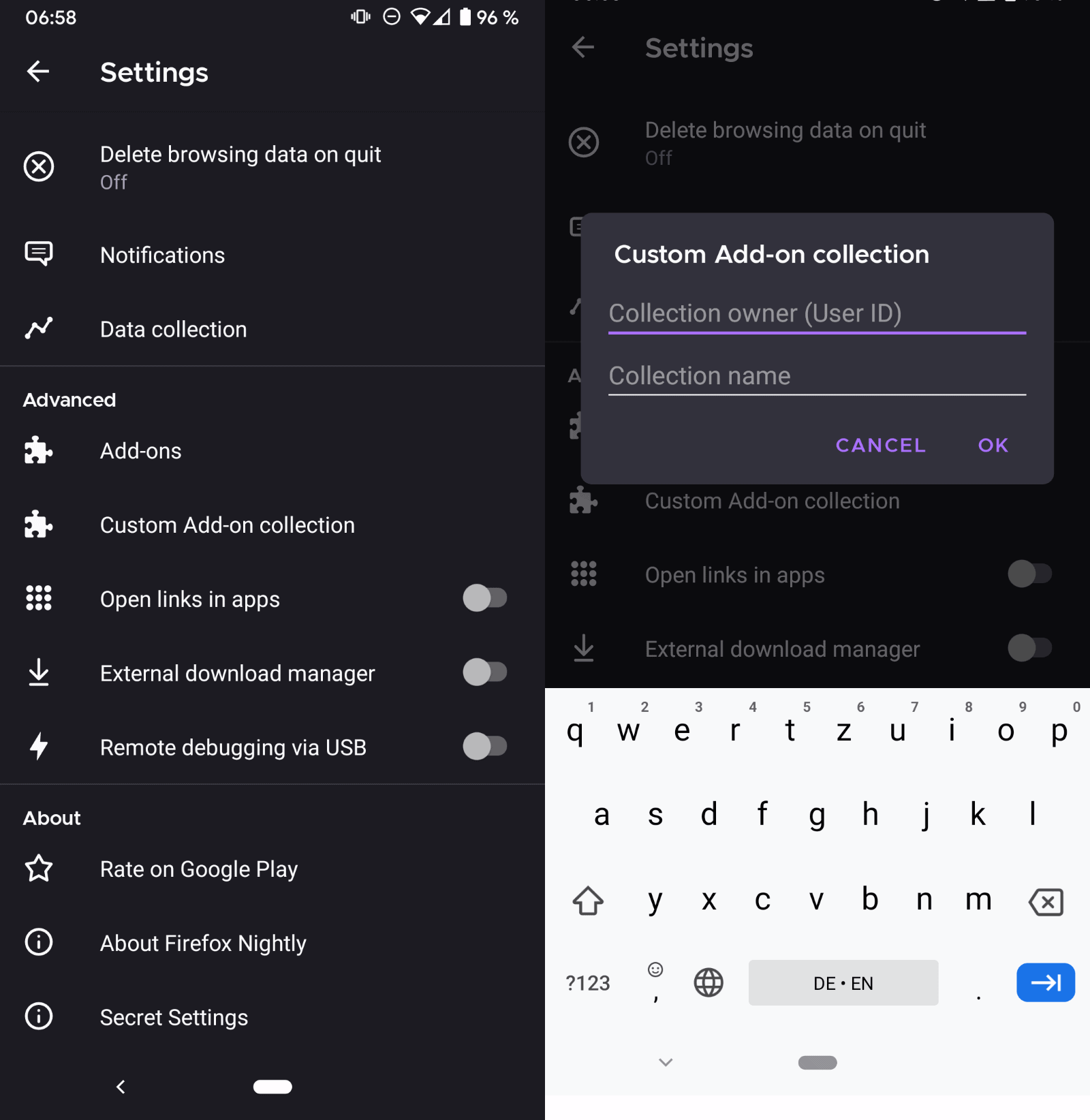
The 2020 method required Firefox Nightly, the debug menu and a custom collection. The steps below describe that old method and are kept for reference only. Use the current menu route above instead.
- Tap on the main menu (three dots) and select Settings.
- Scroll all the way down and select "About Firefox Nightly".
- Tap on the Firefox logo at the top five times until the "Debug menu enabled" notification is displayed.
- Go back to the main Settings page.
- Scroll down to the Advanced section and activate "Custom Add-on Collection".
- Type the user ID of the collection owner and the name of the collection.
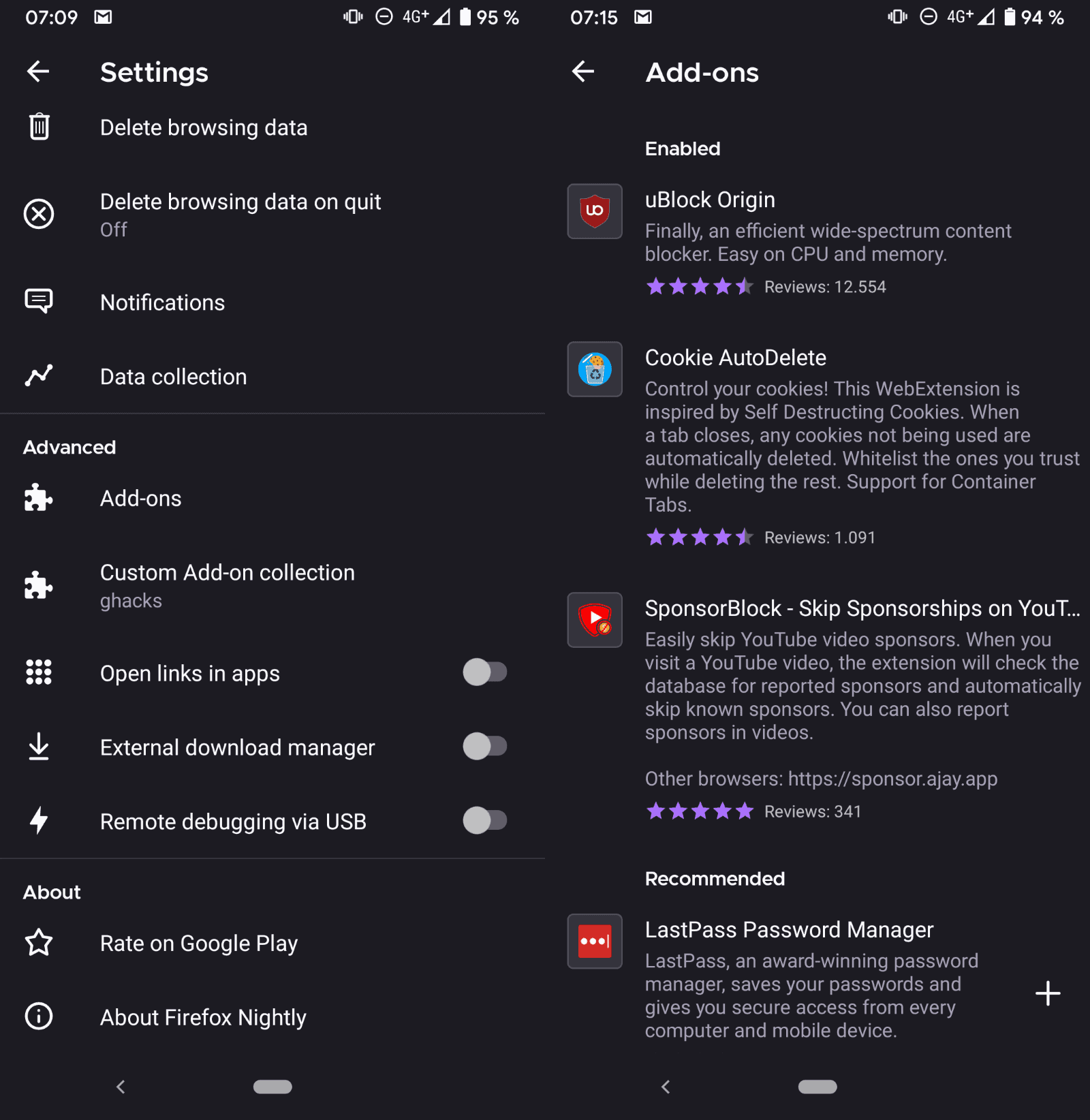
The user ID and name came from a collection on addons.mozilla.org, which required a Firefox account to create. Do not confuse add-on collections with Firefox's newer Collections feature. Changes to a collection were reflected after restarting the browser, and removing an extension from the collection uninstalled it.
Firefox Nightly versus regular Firefox
Firefox Nightly is Mozilla's daily test build, while the regular Firefox release is the stable version most people use. Nightly gets new features first and can be unstable, which is why the 2020 override appeared there and not in the stable release. Install Nightly only if you want to test early builds, and note that the extension steps above for regular Firefox do not require it.
Related: Firefox for Android adds Tampermonkey support, Video background play fix for Firefox Mobile, Best Firefox add-ons

I am not able to translate local html and txt files. When I try to translate the whole page I see under Original “unknown”. I tried ttx and html but I got this subscript. Therefore it goes to nowhere but when I select a paragraph I see 2 windows – original and translates languages. I used Waterfox.
Ehi, can you please try to add the addon ‘StayFree” to the collection? thanks!
Amazing… Thank you
Thanks for your effort,it solves my problem using firefox on android with full extension support.
I don’t see sponsorblock in your collection tho.
sponsorblock doesnt show up in the custom addon collection
that *cks so hard
no way to hide
every click we make
Please can you add blockchain dns to your custom addons
Installing any add-ons on Firefox Nightly shouldn’t be complicated at all. Mozilla has become a sellout to Google and Big Brother. It doesn’t care about your privacy and personal preferences anymore. That’s why Mozilla has been taking away users’ ability to customise their Firefox browsers and protect themselves from Google, which is owned by Big Brother terrorists who make the world burn for money and power by killing journalists, activists, and outspoken people to keep the corrupt corporations wealthy that abuse employees while more people are becoming brainwashed, poor, and/or more dependent on toxic consumerism because toxic corporations like Mozilla are owned by cut-throat sellouts. Google is owned by American government terrorists who legalise elitist online surveillance, legal loopholes, bribery, oligarchic censorship through gag orders that Edward Snowden warned people about, military terrorism through oil wars by raping/killing/torturing people from the middle east, etc. Don’t trust Mozilla is what I suggest you to do.
Ok that’s A LITTLE exaggerated
There’s still only a handfull of addons avaliable for ff on android. Can’t install Adblock Plus wich I use on pc.
There’s a fork of Firefox Mobile available in F-Droid called ‘Mull’. You’ll have to activate the DivestOS repo to access it but it’s well worth checking out.
Mull not only RE-activates about:config by default, but also comes with the Arkenfox hardened user.js prefs preset. The aforementioned, custom add-ons/collections availability is also present in this build.
And yes, it maintains right along with regular Ff for security updates and bug-fixes. I’ve used it sans Gaggle “safe-browsing”, beacons, Normandy/Shield, Pocket, etc. for months now without issue.
Ya know? Web browsers are inherently non-private, insecure and suck in general across the board, considering. That said, if you’re using ANY Chrome/Chromium — but especially friggin Opera or Vivaldi — you’re “doing it wrong”. Kiwi? OK, yeah..some neat-o features for a mobile Chromium but still, gag me.
Even the venerable, Ungoogled Chromium (shout out to Eloston, a top-notch maintainer) was recently found to contain remnant, propritary blobs from Evil-Corp that had gone unnoticed for years. Brave and Bromite are extremely “meh” 2nd/3rd place in the Chromium realm.
But Jesus, people…do your homework. Vivaldi and Opera are both non-starters if relative privacy is even remotely important to you.
“Ooh, neat! A built-in VPN in Opera! Surely *THAT’S* legit.” /sarcasm
Nice ! Could you also please add the addon Web Translate and maybe create a Github site for your open collection ?
https://addons.mozilla.org/en-US/firefox/addon/web_translate/
Thanks for the article. Enabled me to finally re-install “I don’t care about cookies” in firefox android.
Thanks a lot for your efforts Martin!
I hate how each “big-brain” move they made it’s always followed by them selfishly cut support for older version… this time I can’t search any addon on AMO because it always rub me with 0 result when it clearly still there and I must search them from web as workaround, I wonder how long these addon on older version will last before these people just selfishly cut the update for em and make sure you CAN’T get em anymore just like the whole theme mess when they release v65
Dear ghacks team, please add print to pdf add-on on Firefox nightly for Android. Print to pdf was a great feature. Firefox is becoming older.
Can you add Dark Reader? For some reason it broke when I added the custom app list.
Can you ad Tamper Data for FF Quantum? Please
Thanks for documenting this!
FYI The collection manager only searches addons for the browser specified in the URI. But a collection can contain addons for desktop and Android simultaneously.
One just has to change the URI path from /firefox to /android.
Hi and thank you for your great help with these add_one
I really need to download streaming videos and conferences on my android phone , I have tried every thing but the only thing that was useful was using ant video downloade add_on for Firefox , but I cannot add it to my android phone . I wanted to use your method but I did not know the user ID and exact name of this add_,on .
You have kindly said in your website that we could ask you to add specific add_on.
I truly appreciate if you could help me with that.
It is a kind of urgent for me
Thank you
This is really an attempt to monetize the addons. After they ensure no addons can be installed from other sources, they will start curating paid addons, and create an appstore of sort.
While money need to be made, the strategy is completely misguided and flawed.
First, disallowing sideloaded add-on alienates a large userbase. Second, this doesn’t in any way directly affect the strategy to monetize. And then the messed up launch which basically forced a pre-alpha binary with no warning to everybody flung a lot of shit everywhere.
I hope they come to their senses and revive about:config and sideloaded addons, but the chances of that seem very bleak. Under whatever misguided leadership they are flying, they seem to be quite adamant in their mission of wrecking and drowning Firefox.
They’re acting really stupid and stubborn.
What is so difficult about allowing addons to be installed from any location? Technically it’s probably less than 50 lines of code. It would have taken more effort to do otherwise.
They’re clearly trying to monetize the addon system, at the expense of users. How retarded can you be to try to close down a product whose main selling point was that it’s open.
I searched and found an older version of firefox 68.11.0 which i installed with APKmirror. I had t0 switch off playstore autoupdate.
Not any add-on. Only ones on the Firefox Add On website. you can’t sideload an Add On from elsewhere.
Really ? The walled garden intensifies.
That’s the point. They also have plan for developers to pay to get their extension recommended
No, I can’t. I stopped using Firefox on desktop and on Android a month ago.
A horrible solution as it gives mozilla far too much information and control. Though it does prevent the rampant temporary plugin installations scourge, but the cost is too high.
> The entire system is based on Mozilla’s Collections system. It is not possible to install an extension directly from its main Mozilla AMO profile page, and there does not seem to be a way to browse available collections.
Why would they do that ?
> You can create your own Collection but need a Firefox account for that.
Oh, so that’s why, they want us to make accounts to get back removed functionality.
Rats.
> the current implementation is probably the best that Mozilla could do in the short period of time it had after the release of the new Firefox for Android.
The obvious thing to do would have been not to release a browser full of bugs and removed important features. But they are closely following Google in killing the freedom to control our interaction with the web to improve their bottom line. With this new strike more users will be disgusted of using extensions, which is a plus for Mozilla’s long term plans, and as a vicious circle Mozilla will use this as an excuse to further destroy the extension system.
The IceRaven fork for mobile is where it’s at now:
https://github.com/fork-maintainers/iceraven-browser
In addition to restoring the right to use extensions, it removes lots of the tracking and other antifeatures.
F-Droid’s Fennec also introduced a Fenix build (81.1.1), but it looks like it’s a stable build of Firefox, so no addon collection support yet. Proprietary blobs and tracking are removed however.
uBlock Origin, Top and Bottom Scroll Buttons, Redirect AMP to HTML, Video DownloadHelper – these are my current add-ons on Kiwi Browser for Android.
May you add this?
https://addons.mozilla.org/firefox/addon/video-downloadhelper
I also use Kiwi and my extensions are Nano Adblocker, Nano Defender, AutoPlayStopper, Privacy Badger.
I use the same on Chrome on my PC and I have forgotten what ads and rogue pop ups look like. xD
Without these extensions or any other replacements that allow me to have a clean web experience, I’d rather stop using the internet than be subjected to ads and rogue pop ups.
This used to be in the stable(!) version of Firefox, not just in highly unstable alpha builds. The implementation via “collections” is also clumsy to the utmost.
When Vivaldi and Brave introduce unrestricted extension support same as what Kiwi already has, Mozilla will feel the gravity of their mistake. Nobody wants a “curated list” of add-ons in 2020, full add-on support on stable builds is where it’s at. Oh, and while they are at it, also reintroduce about:config please, so that the user finally has a say in what is going on again.
They also need to reintroduce the ability to reorder tabs. I can’t figure out why that feature was taken away.
> Oh, and while they are at it, also reintroduce about:config please, so that the user finally has a say in what is going on again.
That removal was *very* nasty, along with UI prefs disappearing. For example, it’s now no longer possible to prevent mobile Firefox from sending browsing data to Google:
https://github.com/fork-maintainers/iceraven-browser/issues/145
They keep denying that Google can use safebrowsing to track anything but the technical discussion above proves that them and Google are lying.
And the list of other malicious features that could only be removed using about:config is long. This is probably a first step to remove about:config on desktop Firefox too. Later, because users are more defensive there.
Anyone still believing that they remove customization “just so basic users don’t make mistakes” ? When this implies that Google, from whom they get half a billion dollars each year, will be able to track sites and downloads ? And when all this data additionally quietly feeds the US repression apparatus ?
I don’t even know why they decided it’s a good idea to restrict extensions in the first place. Do they think they know what’s best for their users? Let them install whatever they want and have things break on them and report issues rather than restrict the browser and make it feel like a 3rd rate app store browser with almost no features.
That’s why Firefox sucks now on both mobile and desktop – it used to have features that are no longer available and just the thought of that is what makes me not want to use it ever again. At least Chrome stayed the same since 2008. For the average Joe nothing even changed over the years – the UI got some slight changes in button arrangements and theme change, but other than that everything was always the same.
Hello can you put idontcareaboutcookies in the collection? Thank you
Not to mention that you can still install many original extensions from the dawn of Chrome.