Cloudflare Browser Check: Test Secure DNS, DNSSEC, TLS 1.3 and ECH
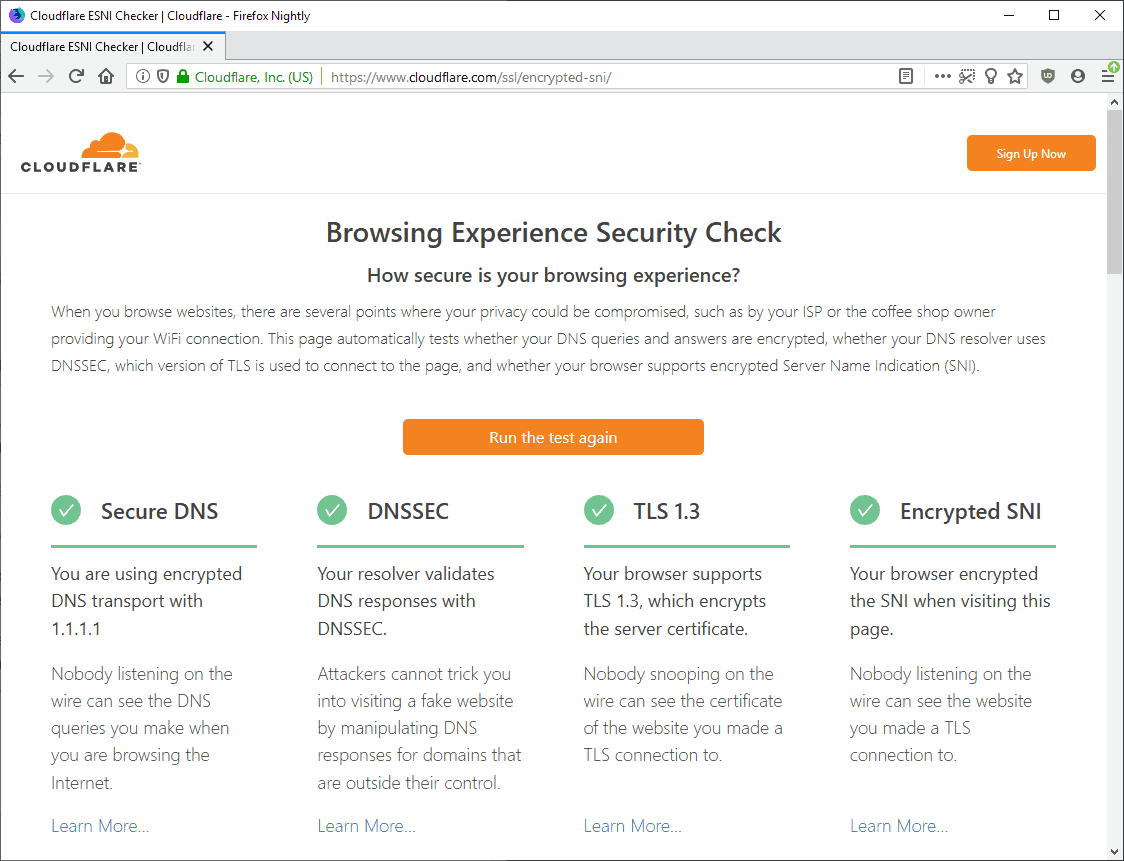
The Cloudflare Browser Check is a free test page at cloudflare.com/ssl/encrypted-sni/ that checks four connection privacy features in your browser: Secure DNS, DNSSEC, TLS 1.3 and Secure SNI (Encrypted Client Hello). Open the page, let the check run, and every test shows whether it passed. Failed tests usually point to a DNS setting, not to the browser itself.
This guide explains what each test measures, why the Secure SNI test fails for so many people, how to turn on the features that are under your control, and which Cloudflare page to use when you only want to test your DNS connection.
What is the Cloudflare Browser Check?
The Cloudflare Browser Check is Cloudflare's online tool for testing how private and secure the connection between your browser and a website is. It was introduced in 2019 as the "Browsing Experience Security Check", and it still lives at the old address that ends in /encrypted-sni/, which is why many people search for the URL directly.
The tool does not scan your computer and needs no extension or account. It looks only at the connection itself: how your browser resolves domain names, whether those answers are signed, which TLS version is negotiated and whether the site name is hidden during the TLS handshake. Cloudflare designed parts of the technology it tests, including Encrypted SNI and its successor Encrypted Client Hello (ECH), so the check doubles as a showcase for features Cloudflare supports on its network.
Results depend on the browser, the operating system's DNS settings, the network and any VPN in use. Running the check in two browsers on the same computer often produces different results, which makes it a quick way to compare them.
How to run the Cloudflare browser check
Running the Cloudflare browser check takes less than a minute and works in any current desktop or mobile browser.
- Open the Cloudflare Browser Check page in the browser you want to test.
- Start the check if it does not begin on its own, and wait until all four results appear.
- Read the result for each test: a pass means the feature was detected on this connection, a fail means it was not.
- Change a setting (for example, turn on secure DNS), restart the browser and run the check again to confirm the change.
Run the check without a VPN first and then with it if you use one. A VPN routes DNS queries through its own resolver, so it can flip the Secure DNS and DNSSEC results in either direction. Corporate networks, parental controls and some antivirus web shields also intercept DNS or TLS and can cause failures that have nothing to do with the browser.
What the four tests check
Each of the four tests in the Cloudflare browser check covers a different stage of loading a website, from looking up the domain to encrypting the handshake.
| Test | What it checks | Typical reason for a fail |
|---|---|---|
| Secure DNS | Whether DNS lookups are encrypted with DNS over HTTPS (DoH) or DNS over TLS (DoT), so the network cannot read which domains you look up | The browser and the system use plain, unencrypted DNS from the ISP or router |
| DNSSEC | Whether the DNS resolver validates signed answers, proving they are authentic and unmodified (it does not encrypt them) | The resolver in use does not validate DNSSEC |
| TLS 1.3 | Whether the browser negotiates TLS 1.3, which also hides the server certificate from observers | Rare today: outdated browser or a security product that intercepts TLS |
| Secure SNI | Whether the site name in the TLS handshake (Server Name Indication) is hidden with Encrypted Client Hello | ECH not active in the browser, or the DNS path does not deliver the ECH keys |
Secure DNS and DNSSEC are both about your resolver, so switching to a resolver that encrypts queries and validates DNSSEC, such as Cloudflare's 1.1.1.1, usually fixes both at once. TLS 1.3 is the one test almost every modern browser passes.
Why the Secure SNI test fails: ESNI was replaced by ECH
The Secure SNI test fails most often because the original Encrypted SNI (ESNI) no longer exists in browsers and its replacement, Encrypted Client Hello, has stricter requirements. Server Name Indication sends the name of the site you visit in plain text at the start of every TLS connection, so ISPs and network operators can see which sites you open even when DNS is encrypted.
ESNI, the first fix, was experimental. Firefox shipped it as an opt-in option in 2018 and removed it in Firefox 85 in January 2021. Encrypted Client Hello (ECH) took its place: it encrypts the entire first handshake message, including the SNI. ECH is now an IETF standard, published as RFC 9849 in March 2026.
Browser support is in place: Chrome enabled ECH by default with version 117 in September 2023, which carries over to Chromium-based browsers, and Mozilla rolled out ECH with Firefox 118 in autumn 2023. ECH needs the site's encryption keys, which the browser reads from a DNS HTTPS record. If the browser cannot get that record, for example because the resolver, router or another network device does not pass it on, it falls back to a normal handshake and the test fails. Encrypted DNS makes it much more likely that the record arrives intact.
The practical fix is the same in every browser: keep the browser updated and turn on secure DNS. Mozilla recommends using DNS over HTTPS together with ECH for the strongest protection.
How to turn on Secure DNS in Firefox and Chrome
Turning on secure DNS in the browser is the single change that fixes the most failed results in the Cloudflare browser check. Both browsers offer it in their regular settings, so no about:config or flag editing is needed anymore.
In Firefox (desktop):
- Open the menu and select Settings.
- Select Privacy & Security in the sidebar.
- Scroll to DNS over HTTPS, click Advanced settings and select Increased Protection or Max Protection.
- Choose a provider such as Cloudflare from the list, or enter a custom DoH address.
Default Protection only uses secure DNS where it is available and falls back to plain DNS on problems, and it switches off when a VPN, parental controls or enterprise policies are detected. Mozilla describes every level on its DNS over HTTPS settings page.
In Chrome:
- Open the menu and select Settings.
- Go to Privacy and security, then Security.
- Turn on Use secure DNS and select a provider, or keep your current provider if it supports DoH.
The same option exists in Chrome for Android, as Google's help page explains; managed devices and devices with parental controls cannot change it. For Edge, Brave, Opera and Vivaldi, follow our guide on enabling DNS over HTTPS in other browsers. Secure DNS does not have to use Cloudflare: other providers, for example AdGuard DNS or Mullvad's encrypted DNS servers, pass the test as well.
Cloudflare DNS test: check your 1.1.1.1 connection
If you only want to test Cloudflare DNS, use the 1.1.1.1 connection check at one.one.one.one/help instead of the browser check. It shows whether your device actually uses Cloudflare's resolver and how it connects to it.
The page lists these results:
- Connected to 1.1.1.1
- Using DNS over HTTPS (DoH)
- Using DNS over TLS (DoT)
- Using DNS over WARP
- AS name and AS number of your network, plus the Cloudflare data center that answered
- Connectivity to the resolver addresses 1.1.1.1, 1.0.0.1 and their IPv6 counterparts
This test is useful after changing DNS on the router or in the operating system, because the browser check only tells you whether secure DNS works, not which resolver answers. Cloudflare asks users who need help to share the page URL in the Cloudflare Community forum rather than screenshots of the results. To see which domains your Windows PC has already resolved, you can also display all cached DNS entries.
FAQ
If I pass all four tests, is my browsing secure?
No. The Cloudflare browser check only covers connection privacy features. It says nothing about trackers, fingerprinting, malware, extensions or the security of the sites you visit.
Does a VPN change the Cloudflare browser check results?
Yes, it can. With a VPN active, DNS queries usually go to the VPN provider's resolver, so the Secure DNS and DNSSEC results reflect that resolver instead of your own settings.
Is the browser check the same as Cloudflare's "Checking your browser" screen?
No. The "Checking your browser" or "Verify you are human" screen comes from the security settings of a website protected by Cloudflare, such as the Browser Integrity Check, which inspects request headers and the user agent. The browser check is a test page you open yourself.
Why does DNSSEC fail when Secure DNS passes?
Encryption and validation are separate features. Your resolver may encrypt queries but not validate DNSSEC signatures, so switching to a resolver that does both fixes the result.
Related: configure DNS over HTTPS in Firefox, Firefox's newer fingerprinting protections

ESNI is no longer supported
WOW cloudflare-dns shows a lot of ads, this is not acceptable!
/etc/hosts ignore
Rather surprised after using FF with the CloudFlare DNS setting for several months, and finding my Linux /etc/hosts “black hole” settings (0.0.0.0 IP assigned to host name) were ignored for Facebook (among a few thousand others in my host file I presume; not checked yet). Then I reviewed the network.trr.mode, and it was set to 2 for automatic HTTPS CloudFlare lookup, but setting it to 1 for faster of either “native” DNS or TRR now seems to check my /etc/hosts first.
Glad I finally plugged that “leak”. Now I need to review if my PiHole is also being bypassed, although it should also be faster as being on my internal home network.
Agreed, Jonas. I use trr mode 3, a big hosts file, and I too…..like the idea that DoH through the browser “ignores” the hosts file, therefore resolving lookups, while other software “behind my back” cannot do so. It seems a really good combination, though I have read many that complain that they don’t like this. I do indeed, pass all the tests on Cloudflare’s test page. Not sure why for some, this is not the case, if they’ve ticked all the right boxes, etc.
I’m a lot more web-nerdy than most people (for example, I’m a fairly good JavaScript and PHP coder, and can configure Apache somewhat), yet 95% of this stuff is over my head. Way too complicated. I skimmed through this discussion and my reaction was “Huh? Whoa, I have too many things to do, can’t spend a week learning this stuff.” I’m glad that so many of you do understand it, since security and privacy are important. But if I can’t, how many ordinary users are ever going to do anything about any of this?
I did go to the linked Cloudflare test page — and, despite using the latest standard version of Firefox (69.0.1) and having my Mac’s system-level DNS set to prefer Cloudflare (1.1.1.1)… I still failed three of the four tests. (The only one that passed was TLS 1.3).
I have one comment and one question…
I’m not sure it’s a bad thing that Firefox ignores my carefully customized hosts file. The hosts file successfully prevents some of my software from phoning home behind my back… but I still want Firefox to be able to go to that company’s website. In some cases, the sneaky “phone home” uses exactly the same domain as their website does, so my hosts file blacklists the whole domain — but Firefox still resolves it, which I think is good.
Question: This conversation seems to be all on the web-client-side. What about the server side? Is there anything I need to do on my Apache web servers so they will still work with all this added security stuff when it becomes standardized in the browsers real people are using?
I reloaded the test website (but I haven’t restarted firefox yet) and now it won’t connect to the page because it says it might not be secure. lol
i use up-to-date Firefox Nightly. i have many extensions. HTTPS Everywhere, uMatrix, Chameleon, …
Hello. i has enabled all and has restarted. but i can’t open below link:
https://www.cloudflare.com/ssl/encrypted-sni/
shows this error:
Secure Connection Failed
An error occurred during a connection to http://www.cloudflare.com. SSL_ERROR_MISSING_ESNI_EXTENSION
why?
Which version of Firefox have you enabled this on? Do you run extensions that may interfere?
when i disabled the Kaspersky TS 2020 ‘Web Anti-Virus’ , and now problem has fixed.
what is the reason? what i should do?
@Tom
“I thought you might have the answer.”
No. As I wrote you I made the script by adapting online examples and I never studied Python or AutoHotkey rules. Luckily coding has its logic and I didn’t curse so much. Feel free to post it at AutoHotkey community if you have another questions or whatever you want. You can be sure that probably some user of the community will be improve it and could be a good thing due to the fact I don’t know another method on Windows to easily perform the update of Acrylic HOSTS file.
However seem that testing the presence or not of the ‘comma’ gives the same result, but simply follow the official examples if you are not sure: https://autohotkey.com/docs/commands/Sleep.htm
(MsgBox, Ciao! Sleep, 10000 MsgBox, Hello!)
(MsgBox, Ciao! Sleep 10000 MsgBox, Hello!)
@Tom
“I was wondering how the 10 second delay actually works given there is no comma”
Boh! :-)
Three hypothesis:
a) the ‘comma’ is not so strictly necessary
b) restart a service requires that you stopped it first and 10 second is not a big delay. So without comma the command doesn’t work but you don’t realize it due to normal system stop\start time.
c) neither a) or b) —> Ask to AutoHokey community :-)
Simply you can create two new script (with and without ‘comma’) only with the service start/stop command and set a big delay to test the hypothesis.
@Shiva, I think hypothesis (a) is the best. I’d have to test but given I’m zen (“lazy” so to say) I thought you might have the answer. As I had written, AutoHotkey’s documentation for ‘sleep’ doesn’t mention the comma (which doesn’t mean as you say that it’d be strictly necessary.
This is relevant of what has always bothered me with code, where the syntax is sometimes so strict that it’ll require/differentiate lowercase/uppercase and sometimes won’t require strict obedience. As a matter of fact this is true for languages as well when grammar is comprehensible and admitted but when spelling is sometimes beyond any logic rule : why one ‘l’ and two ‘t’ for instance? Avoiding those mistakes, because they are tied to no rule, requires reading, and not only comics. Same I guess with code : before coding read others’ code :=) …
Waterfox will support DNS over HTTPS with the release of v68 according to this Reddit thread: https://www.reddit.com/r/waterfox/comments/bioat5/does_waterfox_support_dns_over_https/em3a289/
Interestingly Pale Moon supports TLS1.3 https://imgbox.com/a8CnIkzh
As far as Waterfox is concerned there’s an ongoing discussion over on Github which may be of interest to folks: https://github.com/MrAlex94/Waterfox/issues/783
Well, I like browsers related stuff, but this is getting too complex…
LoL
Right you are sir. Personally I just fake it while blowing smoke. ;)
@Tom
“Your script works perfectly. Of course I modified the sources. Result is 100% that of HostsMan.”
Glad to see that it works with another user. 101%, if I remember well HostsMan doesn’t sort alphabetically the merged domains (good for Acrylic). But I kept HostsMan for the HOSTS file, it is the best manager of its category.
Next time will be your turn to teach me how use your future modify script with only
DNSCrypt-Proxy. :-)
But wich lists did you add? Honestly StevenBlockHost or hBlock are enough.
@Shiva, I see on your script the use of ‘sleep’ always followed by a comma, i.e. ‘sleep, 2000’ … except at the end when stopping/starting AcrylicDNSProxySvc : sleep 10000 (no comma).
I’ve searched for the sleep reference on AotoHotkey’s documentation but found no occurrence of sleep n (no comma).
AcrylicDNSProxySvc is correctly stopped and restarted but I was wondering how the 10 second delay actually works given there is no comma.
Thanks!
@Shiva,
DNSCrypt-proxy as you know has no installer, you just download the release you need from https://github.com/jedisct1/dnscrypt-proxy/releases, unzip it and place it where you want.
All settings are done within the dnscrypt-proxy.toml file. That’s all.
Of course those settings have to be carefully chosen. All is explained in the Wiki at https://github.com/jedisct1/dnscrypt-proxy/wiki
I can’t detail everything here but users of Acrylic who have coupled it with DNSCrypt-Proxy must be aware that DNSCrypt-Proxy’s blacklist, whitelist, cloaking and forwarding rules won’t apply considering Acrylic takes the relay as soon as the dns request has been handled by DNSCrypt-Proxy.
If you, Shiva, or anyone wished any help/advice on a particular point, of course feel free to ask. Though I’m as a tech pro as light in hell, if i know the answer I’ll provide it.
> “But wich lists did you add? Honestly StevenBlockHost or hBlock are enough.”
With Acrylic, I have two categories:
1- The hosts files I used to install with Hostsman, now downloaded/merged with your script :
AcrylicHostsGroup1.txt (1.8 MB) :
https://zeustracker.abuse.ch/blocklist.php?download=hostfile
https://zerodot1.gitlab.io/CoinBlockerLists/hosts
https://raw.githubusercontent.com/lightswitch05/hosts/master/ads-and-tracking-extended.txt
https://raw.githubusercontent.com/lightswitch05/hosts/master/tracking-aggressive-extended.txt
2- The filters I’ve built myself using the Acrylic’s wildcards, mainly the >
All those are contained in AcrylicHostsGroup2.txt (172 KB) :
Because of the power of wildcards 1 filter can handle what is handled within sometimes dozens of lines in typical hosts files. That is really powerful.
That’s about it. I also use the PeerBlock application which presently takes care of 128,034,695 IPs
Power as well!
Do it to them before they do it to you (smiles as fists when you think about it!)
@Richard Allen: “a hosts file will Never work with DoH because it is an in browser solution and does not use the system DNS resolver.”
There is no technical reason why DoH cannot be made to respect the hosts file. The DoH code could read the hosts file directly and respect its contents, after all.
@John Fenderson
I wouldn’t be surprised if you are right! :)
I’m thinking I was paraphrasing what I read on a mozilla blog, just a guess. Would be nice if they gave it the ability to read the hosts file but I’m not holding my breath.
All interesting; sister site BetaNews provides a decent website checker. The results for Ghacks:
https://www.immuniweb.com/websec/?id=OTU6wJxq
And when visiting immuniweb CanvasBlocker shows: “Faked DOMRect readout on http://www.immuniweb.com (3)”
LOL Just can’t win cause the odds are against us. ;)
Regardless, I’ve bookmarked the site. TY
network.trr.mode set to 2 allows for fallback to system DNS in the event of a Cloudflare lookup fail.
Once you confirm things work OK with mode 2 change the mode to 3 and edit network.trr.bootstrapAddress to 1.1.1.1. Don’t change network.trr.uri.
As Richard Allen noted above, mode 3 locks Firefox to Cloudflare’s DoH.
In an appropriate network monitor, you’ll find a persistent port 443 connection to 1.1.1.1 (host name, one.one.one.one) and no port 53 activity while surfing with Firefox.
• Setting network.trr.request-timeout to 10000 has been suggested in forums here and there.
I’ve been running with this setup for several months. (And mode 2 for many more before 3.)
For the adventurous, AdGuard has a good section for other DoH providers in their Known DNS knowledge base:
https://kb.adguard.com/en/general/dns-providers
One can bypass Mozilla’s Cloudflare scheme by using https://cloudflare-dns.com/dns-query
I’ve found so far either of the two to be the most efficient and the only ones to pass all four of Cloudflare’s Security Check. Obviously.
… But after restart Firefox couldn’t access any page – reverted to network.trr.mode=2 (‘Secure DNS’ and ‘Encrypted SNI’ tests fails with that setting).
All test passed in Firefox 66.0.3 only after setting network.trr.mode=3 and then toggling network.security.esni.enabled=true again.
@Tom
“I’ve got the ingredients and the recipe, I’ll see how I can cook”.
Bon appétit. If you need help simply ask. AutoHotkey is terrific, you will see how quickly it process all the lists to one file.
@Shiva, the result is gastronomic :=)
Your script works perfectly. Of course I modified the sources. Result is 100% that of HostsMan.
Hostsman will be now removed, no further needed.
I guess I can warmly thank you : thanks!
“Which privacy and security extensions or settings do you use in your browser?”
The only security extension I use in my browser is NoScript. I do also use a firewall on my mobile devices.
But I use my browser in an unusual way — all of my internet activity (including mobile, by using my own VPN server) gets funneled through my servers at home. There, I can engage in much more robust defenses than is possible from the browser.
This is particularly true since I set up a MITM HTTPS proxy. While I did this originally in order to mitigate the security problems that DoH brings, I have since found it very useful in order to engage in more comprehensive security scans than are otherwise possible.
I am very happy with my current approach, but readily confess that it is not one that most people can realistically use.
ff 60.6.1esr also supports doH, but not esni, and may not be as robust as the later versions 64-66. If you set it up on esr, you can check its performance under: about:networking#dns.
I have been using it for quite some time now on both ff release channels for desktop, and on android fenec-fdroid.
I started using DoH in Nightly about a year ago along with ESNI when it was offered. My main FF profile has been using DoH and ESNI since it was available in the FF release. That said, I’m not using DoH or ESNI in my FF Test profile only so that I will have something to compare to and I also have chromium browsers installed that I can use for comparison.
I’ve been using the default “network.trr.uri” which is cloudflare, I have seen but not used other uri options from Google. I use a little different setup in that I’m using the bootstrapAddress 104.16.112.25 with TRR mode 3 which forces “TRR Only” to be used. Based on my experience DoH and ESNI have been extremely reliable, I haven’t experienced a single DNS resolve failure in the last year and my ping has always been as fast as my system DNS which I check every month or so using DNS Benchmark. Current ping of 11 milliseconds in FF.
Screenshot: https://i.postimg.cc/52Str2bG/DoH-ESNI.png
The privacy and security extensions I’m using are:
FF Content Blocking: blocking all trackers with a small handful of whitelisted sites, blocking all 3rd-party cookies, very light resource usage.
CanvasBlocker: very light resource usage.
No-Script Suite Lite: used only as a javascript whitelist, will auto disable js on all new sites, very light resource usage.
Privacy Possum: blocks etags and tracking headers.
Tampermonkey userscripts: conceal history length, general url cleaner, redirect away.
uBlock Origin: globally blocking 3rd-party iframes and using noop rules for embedded video, blocking 3rd-party js on a few dozen sites.
Way too many security, privacy and network settings in about:config to list.
@ Richard Allen, I guess you’re aware that ‘uBlock Origin’ may be set to block javascript by default and allow a site specifically (whitelist) or the other way around (blacklist scheme), yet you use the ‘ No-Script Suite Lite’ extension which performs the same. So I’m wondering why. Are there any advantages to use ‘No-Script Suite Lite’ rather than uBO’s built-in javascipt management?
That’s all :=)
@Tom Hawack
Yes sir, you’re right in that what I do does kind of sound bass-ackwards. :)
First, because of all the feeds I see in Feedly I might end up visiting a couple dozen new sites some days, I get 300-500 feeds on weekdays, not that I read them all. When visiting new sites I want ALL inline, 1st-party and 3rd-party js disabled. If a site is working with all js disabled I generally leave it like that, depends on how much interaction with the site I need. If a new site requires me to whitelist it in No-Script to be able to view Any content, that will almost always be my last visit. Of course I could disable 3rd-party and/or 1st-party js with uBO before whitelisting the site but I’m all about ease of use and speed to visual gratification. I want to see something Before I decide to enable Any js. Also, in the extremely rare occurance of an unwanted redirect that tab will absolutely have all js disabled. In No Way do I want to start all websites with all js disabled in uBO and I will refer back to “ease of use and speed to visual gratification”.
Second, I almost always Only disable 3rd-party js on sites that connect to more than 10 domains. Very few websites have a legitimate reason, in my opinion, to connect to more than 10 domains. Right now, I have 40 websites with 3p js disabled and I’m guessing 5-15% of all websites have js disabled completely because they work well enough for my purposes. I will agree that it is safer to globally block 3rd-party js but I’m willing to accept the risk because of the totality of my configuration.
Third, performance. If I control js exclusively with uBO what will that do to the size of the uBO database? Right now I have 109 personal filters and 180 rules. I’m guessing that if I was to only use uBO to control js that My Rules would double or triple in size. How many rules are you using Mr. Tom???? Would really like to know. And we all know that uBO and anything comparable is not exactly light on resource usage, not that I’m complaining. And I have no idea how the new storage api whatever blah blah will improve db resource usage. But I do know that No-Script Suite Lite uses a very small fraction of what uBO uses. Right now uBO is using 13.1 MB of memory, No-Script Suite Lite is using 446KB and I have 9 tabs open.
Fourth, ease of use. Way back when I first started to use uBO I tried living with 3p iframes and 3p js disabled and it got to where I wanted to physically assault someone. ;) I personally think that my current system is much easier and faster to use and I’m extremely skeptical about my combination of uBO and No-Script using more resources than doing the same thing with only uBO. I’ve said it before, my main priorities are speed and ease of use. And I’m willing to bet that my browser config is safer and faster than 99% of all browsers out there. I can live with the level I’m at now.
That’s all folks!
I know, TL;DR sorry. Meant to get back to you earlier but I’ve been swamped over here.
Peace brother! ;)
+1 with @Shiva & @Tom, dnscrypt-proxy is superb and one of the best tools to restore control of your machine back to you and away from corporations and other assorted miscreants. Also, thank you for this article Martin, though a few advanced users will never use browser based dns, it is a really good article. I’ve been waiting for sni masking for quite a while.
https://github.com/jedisct1/dnscrypt-proxy/releases
imgur.com/d8J7frW
“Contact your DNS provider or try using 1.1.1.1 for fast & secure DNS.”
They might as well just rephrase it to: please use our DNS service. Please!!!
Hmm, No.
@Yuliya,
The interesting thing about that is that I was using Cloudflare’s 1.1.1.1 configuration when I first ran the test without logging into a VPN. The message I got that time was that the test was able to detect that I was using their DNS server, but not over a secure connection.
When I logged into Tunsafe’s Wireguard client, the results were disappointingly the same as those using just my ISP’s connection. I shall have to go take that up with them.
Even logging into AzireVPN and using their own encrypted DNS server the results were still disappointing since both TLS 3 and SNI resulted in a red X with just a question mark in an orange circle for the other two even though Waterfox 56.2.9 supports TLS 3. The actual setting in prefs is: security.tls.version.max;3. The setting “network.security.esni.enabled” isn’t present at all in Waterfox even though an update to the current version only took place a couple of days ago.
Food for thought……..
I just tested Secure DNS in Firefox (v66.03) again. Firefox still does not use the host file to block sites when using Secure DNS. So they closes some holes and opens others.
Why do people who say privacy and security is a main priority make such obvious mistakes?
The hosts file not working with DoH has been known for over a year and a hosts file will Never work with DoH because it is an in browser solution and does not use the system DNS resolver.
I’ve been using a hosts file for maybe 12 years now and didn’t like that DoH was not using the hosts file at first but the reality is, does anyone using a hosts file not use in browser content blocking? I’ve personally never met anyone that Only uses a hosts file, just saying. Also, a hosts file will always have slower page load times than when using in browser content blocking like uBO. In my case, even when not using DoH my hosts file really isn’t used 99.9999% of the time unless I disable uBO but then FF Content/Tracker Blocking catches most everything. I’ve personally never seen an ad when only using the built-in FF Content Blocking. Not saying it’s impossible, I’ve just never seen an ad. Most of the time I only use a small malware only hosts file instead of my big one because I’m often testing in browser content blocking, and to see what kind of non-sense publishers are pushing to their visitors.
Personally, I’ve gotten over DoH not using my hosts file in FF. Normally, when not using DoH, my hosts file, is like the second or third line of defense, depends on which browser I’m using. With FF I might disable uBO to access a website but I never also disable FF Content Blocking, I’ll just move on. Anyway, you should absolutely use which ever setup that you are comfortable with, I’m fine with using DoH. And, just so you know, I haven’t so much as seen a single malware object, trojan or virus in about 12 years. ;)
The article states regarding Secure DNS, “[…]Two standards, DNS-over-TLS or DNS-over-HTTPS fall under the category.”. In fact there is a third one, DNSCrypt .
jedisct1, the developer of DNSCrypt, wrote ( https://www.reddit.com/r/privacytoolsIO/comments/7wakeh/dnscrypt_v2_vs_dnsoverhttp2/ ) :
“DNSCrypt is faster (over UDP, which other options don’t support) and slightly safer than DoH. It was explicitly designed for DNS, doesn’t allow insecure parameters, is way simpler (= reduced attack surface), and has proper padding.
DNS-over-HTTP/2 is easier to deploy, as it can be served as a web page. But certificate management can be tricky.
dnscrypt-proxy supports both protocols. Unless one of them gives you systematic issues due to your ISP blocking it, you should just leave them both enabled. dnscrypt-proxy will try all the configured resolvers, and use the fastest ones no matter what the protocol is.
DNS-over-TLS is useless. It has zero benefits over these, so it is not implemented.”
To what extent is this true, I have no idea. If DNSCrypt code supports indeed DNSCrypt and DoH but not DoT, some Secure DNS resolvers will support all or not. CloudFlare does not support DNSCrypt while Quad9 supports all three, for instance.
At this time I use DNSCrypt-Proxy with Quad9-dnscrypt servers, mainly. I do happen to use CloudFlare’s DoH servers though.
I couple DNSCrypt-proxy with ‘Acrylic DNS Proxy’ via port 40,
DNSCrypt-proxy : listen_addresses = [‘127.0.0.1:40’]
Acrylic : PrimaryServerAddress=127.0.0.1 AND PrimaryServerPort=40
Acrylic because I find it easier to handle my blocking lists. DNSCrypt-Proxy fandles blocklists as well but requires a python script to concatenate several sources; also, more complicated for handling HOSTS sources.
I’ve returned to the use of DNSCrypt-proxy recently after having been an Acrylic only user for some time.
@Tom
“Acrylic because I find it easier to handle my blocking lists. DNSCrypt-Proxy fandles blocklists as well but requires a python script to concatenate several sources; also, more complicated for handling HOSTS sources.”
Now I use an Autohotkey script. No Phyton or Autohotkey required (use compiler).
https://file.town/download/cd96za63k0ha0scjsob98vwc1
@Shiva, my wondering was about using only DNSCrypt-proxy without Acrylic for the blocklists.
Your script means using Acrylic and appears to me pertinent if the HostsManager application is not installed, because your script will perform what HostsManager does (concatenate, remove duplicates, set 127.0.0.1 to 0.0.0.0)
Using Acrylic together with HostsManager (to manage hosts various sources) together with my very own list(s) with Acrylic’s very INCLUDE EXTERNAL HOSTS FILES section makes it as simple as it can be… but requires the Hostsman application, indeed. Your method/script has the advantage of avoiding a third-party application such as Hostsmanager.
@Tom
“My wondering was about using only DNSCrypt-proxy without Acrylic for the blocklists”
This is the first thing I tried to do after I installed SympleDNSCrypt, but with my limited knowledge I found more simple coupled DNSCrypt-proxy with Acrylic and its HOSTS file. And yes, without Acrylic you have to use a python script to build a big list.
https://github.com/jedisct1/dnscrypt-proxy/wiki/Public-blacklists
But I don’t understand your needs about the HostsManager. If I remember you disabled your HOSTS file to use HostsMan (.ehm backup) for update your Acrylic HOSTS file. The AutoHotkey script do the same operation of HostsMan. If you need a specific list simply open with Notepad++ the script and add your list with this block (change the link to the list and the name of the file):
UrlDownloadToFile, https://raw.githubusercontent.com/anudeepND/blacklist/master/CoinMiner.txt, C:\Program Files (x86)\Acrylic DNS Proxy\Temp Lists\Hosts List AnudeepND (CoinMiner).txt
FileRead, var, C:\Program Files (x86)\Acrylic DNS Proxy\Temp Lists\Hosts List AnudeepND (CoinMiner).txt
IfInString, var, 404: Not Found
{
MsgBox, Hosts List AnudeepND (CoinMiner) download failed!
return
}
If you want to disable a list or a command (like restard the service) you have to put “;” on each line of the command.
There’are some list only available with HostMan (which list?) of do you want merge Win HOSTS file to Acrylic target big list, simply add this command before download the list (line 3) to the script:
FileCopy, C:\Windows\System32\drivers\etc HOSTS, C:\Program Files (x86)\Acrylic DNS Proxy\Temp Lists\Hosts List My HOSTS file.txt\, 1
(no tested I believe it is the right command)
Surely using UrlDownloadToFile you don’t encounter in any error to download lists (do you remember issues with HostMan or Seqdownload regards some lists?). I use it as I wrote in the. docx file and I forget to update every day the AcrylicHostsGroup1.txt.
@Shiva,
“But I don’t understand your needs about the HostsManager.”
“The AutoHotkey script do the same operation of HostsMan.”
Yes, I understand that. I’ve read the UpdateHostsLists.docx included in the your script’s ‘Temp Lists’ folder, but the point is I don’t understand how to start your script.
In UpdateHostsLists.docx I read,
“Programs installed: Python + Requests Library (.pyw) or AutoHotkey (.ahk) or nothing (.exe with PyInstaller\AutoHotkey compiler)”
OK. I have neither Pyton nor AutoHotkey installed, so I rely on “nothing (.exe with PyInstaller\AutoHotkey compiler)” … what .exe? How do I start/run the script?
Sorry for not understanding immediately what a more technically inclined user could, but the point is I don’t understand, even after having read the docx explanations, how to deply your script. I have to download the various hosts files myself, in a given folder, right? The your script will merge them, right? But how do I start your script? Lol, that’s what i’m missing!
@Martin, ghacks’ big boss : sorry for squatting the blog with our close to live dialogs :=)
I believed you use AutoHotkey. Sorry
Download it without install (https://www.autohotkey.com/download/ahk.zip) and use the Ahk2Exe.exe to complile .ahk script to exe (this is why I put an icon file in Temp List).
Obviously, don’t throw away the .ahk file, maybe you will have to make changes (es. new link of a list).
But probably it is more simple install AutoHotkey and test .ahk file until you will finish with your changes. Be sure that Internet Security doesn’t block the download of the list.
“I have to download the various hosts files myself, in a given folder, right?”
No, you have to set like I wrote you above the links of the list and the names of the saved file. The script is set with the lists I use, but you simply add or remove them. Forgot HostMan and SeqDownload.
Tom, I really haven’t any knowledge about coding. I simply searched on DuckDuckGo the commands I need to perform each operation and I merged all into one non ‘elegant’ script. And this is why a non-technical user (like me) can simply modify it, especially you that you are more informed than me. You only have to take your time with the script opened in Notepad++. and you will see that it is not difficult.
@Shiva, now I understand! From there on I understand your reasoning and the script’s deployment. OK. I’ve got the ingredients and the recipe, I’ll see how I can cook. Thanks!
@Shiva, many thanks but how does script work, what does it perform exactly?
You see, with Acrylic I have the option to include whatever blocklists provided they have the 0.0.0.0 (or 127.0.0.1) preceding the hostname, so I can consider my very HOSTS file (though disabled because handled by Acrylic) together with my own entries, i.e. in AcrylicHosts.txt :
# INCLUDE EXTERNAL HOSTS FILES
@ d:\My Data\BLOCKERS\Acrylic\AcrylicHostsGroup.txt
@ c:\Windows\System32\drivers\etc\HOSTS.ehm
where HOSTS.ehm is my disabled HOSTS file. Acrylic will concatenate both and remove redundancies.
So what I’d need for DNSCrypt-proxy alone, without Acrylic, is a way to concatenate several sources, then have the 0.0.0.0 removed should the sources have the hosts file format because DNSCrypt-proxy does not handle that format (maybe SimpleSNScrypt does that job, no idea).
All this is simplified with Acrylic. Your script may perform all this but if you could adding a description to this ‘Temp Lists’ would be welcomed.
@Tom
“So what I’d need for DNSCrypt-proxy alone, without Acrylic, is a way to concatenate several sources, then have the 0.0.0.0 removed should the sources have the hosts file format because DNSCrypt-proxy does not handle that format (maybe SimpleSNScrypt does that job, no idea).”
If I understand well, you only need to remove 0.0.0.0 from the big list made with HostMan to use it with DNSCrypt-proxy?
You can use the Autohotkey script and add a simple search and replace command to delete 0.0.0.0 form each line and then change the command “filemove” to move the result to the DNSCrypt-proxy target file. Also change the service restart command from AcrylicService.exe to dnscrypt-proxy.exe
@Shiva, my fault, I just found the included UpdateHostsLists.docx in your ‘Temp Lists’.
I’ll check all that out.
I just realized the article focuses on browsers’ Secure DNS whilst my comment regards a system-wide DNS encryption. I wouldn’t use browser specific, application specific DNS protocols. Same as VPN: system-wide, always and only.
Hi Martin,
I made the about:config change to enable encrypted SNI but the Cloudflare test page still shows “Your browser did not encrypt the SNI…” Any ideas why it didn’t work?
Same here and I restart Firefox. Because I use SimpleDNSCrypt with Cloudflare resolver I tried both with network.trr.mode 0 and 2 settings (maybe it is a SNI connected parameter into Firefox), but doesn’t change red icon.
However there many orange “?” if set another (doH) or (DNSCrypt) resolvers… I can’t make heads or tails of it, but it seems more a Cloudflare usage test than a DNS security test.
@Shiva, you’re using SimpleDNSCrypt,the front-end DNSCrypt application, hence system-wide, no need to parasite this with Firefox’s TRR, consequently be sure to disable Firefox’s TRR by setting (about:config or user.js),
(“network.trr.mode”, 5);
(“network.trr.bootstrapAddress”, “”);
(“network.trr.uri”, “”);
(“network.trr.custom_uri”, “”);
Cloudflare’s test page shows me similar results to those you mention, it’s not made for testing system-wide DNS encryption, obviously.
@Tom
Thanks for the clarification. Except for network.trr.mode (it was set to =0) I already have the other parameters ” “. We use the same programs via port 40 (and also PeerBlock for IP in addiction of Acrylic HOSTS file).
@Shiva, OK, a bit of misunderstanding on my part.
– You were testing Firefox’s TRR to meet Cloudflare’s very test page, but you are aware TRR is useless (to be disabled) provided a system-wide DNS encrytion;
– You and I use Acrylic together with DNSCrypt,
— You use your ‘Temp Lists’ to concatenate various hosts sources, I use the Hostsman application
— You use DNSCrypt’s SimpleDNSCrypt front-end, I use DNSCrypt-Proxy.
Fine!
“Firefox’s TRR to meet Cloudflare’s very test page”
Honestly, I was testing “Check if your browser uses Secure DNS, DNSSEC, TLS 1.3, and Encrypted SNI” and this why I also made the test with network.trr.mode=2 and network.trr.uri=https://mozilla.cloudflare-dns.com/dns-query
Ok, we use the same “services” about DNS and different list… :-) And probably we use a different approach and lists also with PerBlock if we really need to be picky… :-)
Did you restart Firefox? It seems necessary to do so.
@Martin Brinkmann: Yes, restarting Firefox was the first thing I did when I noticed that it hadn’t worked the first time.
I notice your screenshot indicates Firefox Nightly–perhaps this is the reason it’s working for you and not for some of us? Perhaps it works in Nightly but it’s not possible to enable encrypted SNI in Firefox 66.0.3 stable?
that is certainly another possibility. The preference exists but if Mozilla is still working on the feature, it may not be implemented fully in the stable version.
ESNI not working on Firefox 66.03 stable on a Mac for me.
The rest work fine, just not ESNI.
I thought this feature was now indeed on the stable channel?
Google Chrome not offering option Encrypted SNI?
I could not find the option in the latest Chrome Canary or Stable. It does not seem to be on the chrome://flags page.
Martin — https://bugs.chromium.org/p/chromium/issues/detail?id=908132
Thank you, that is good news!